Model comparison
GPT Image 2.6 vs GPT Image 2.5
For animated GIFs, consider 2.6. For still images, compare text, instruction following and your actual budget. These first outputs and their test conditions help you choose for your own brief.
Choose 2.6 if you
- Want animated GIFs from a prompt
- Find the actual 2.6 examples useful for your brief
- Can test your own prompts before choosing
Stay with 2.5 if you
- Already get results you love from your prompts
- Prefer how the 2.5 poster follows the coffee instruction
- Need still images and do not currently need GIF
Side by side
Same prompt, two versions
Each pair shares its prompt and aspect ratio. Pixel dimensions differ and are listed below each image. Compare composition and adherence to the brief without inferring a performance ranking.
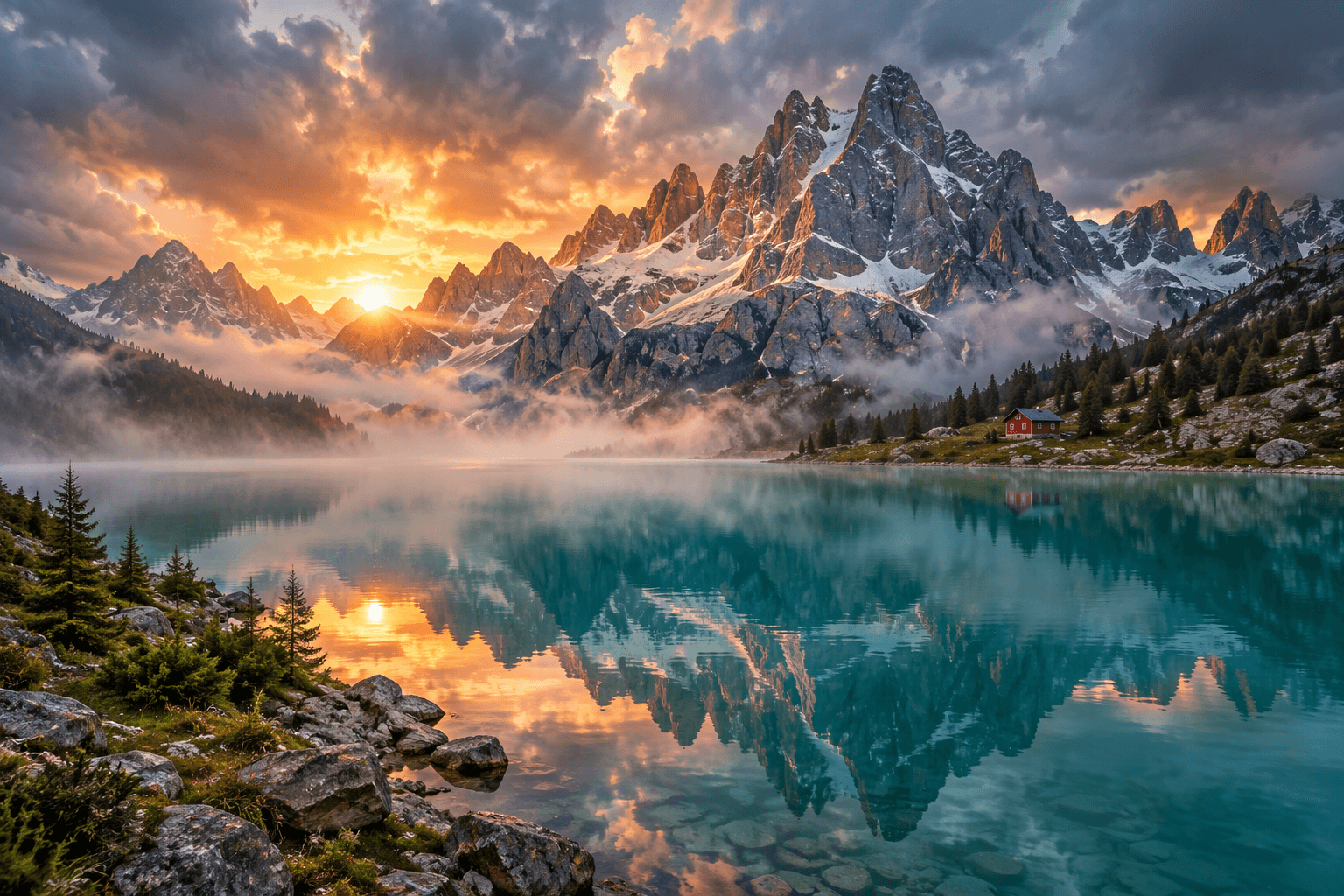 GPT Image 2.5 Flare
1536 × 1024 · medium quality
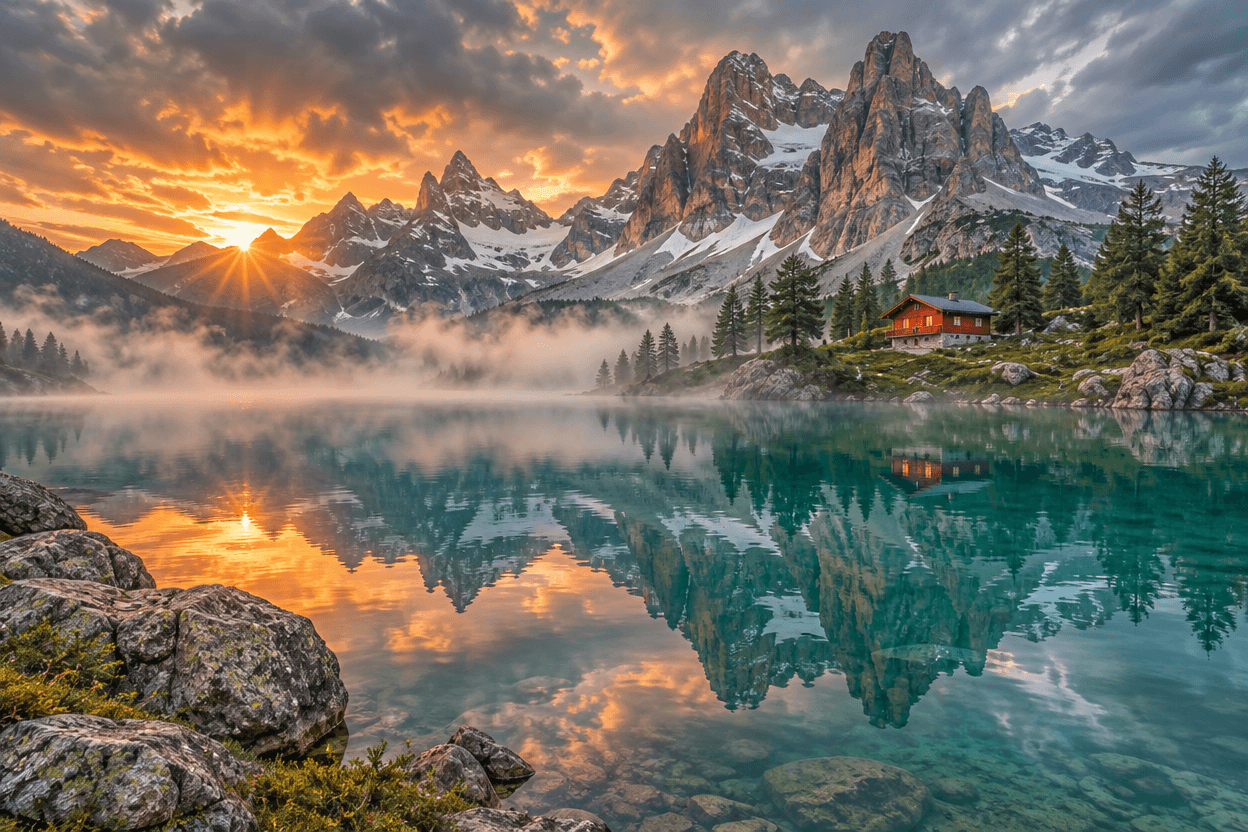 GPT Image 2.6 Flare
1248 × 832 · medium quality
Alpine first light
Same prompt · 3:2 · Flare
Prompt
An extraordinary cinematic landscape photograph of a turquoise glacial lake beneath jagged snow-capped mountains in the Dolomites, glowing apricot sunrise breaking through storm clouds, one small red alpine cabin on the far shore, mist floating above still water, vivid but natural teal and amber colors, delicate mountain reflections, dramatic scale, refined editorial travel photography, realistic atmospheric depth, rich fine detail, no text, no watermark, no border. Landscape composition, 3:2 aspect ratio.
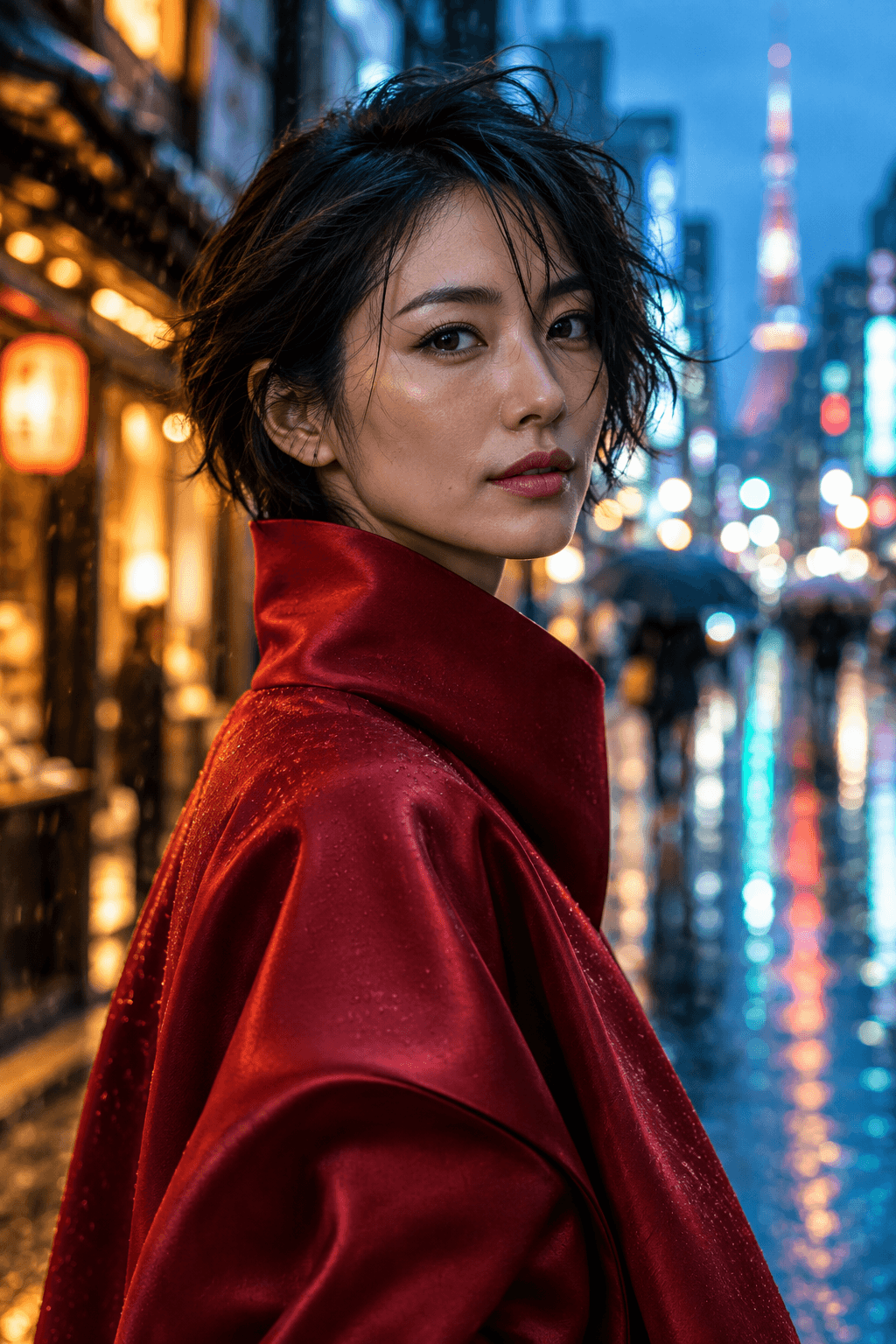 GPT Image 2.5 Flare
1024 × 1536 · medium quality
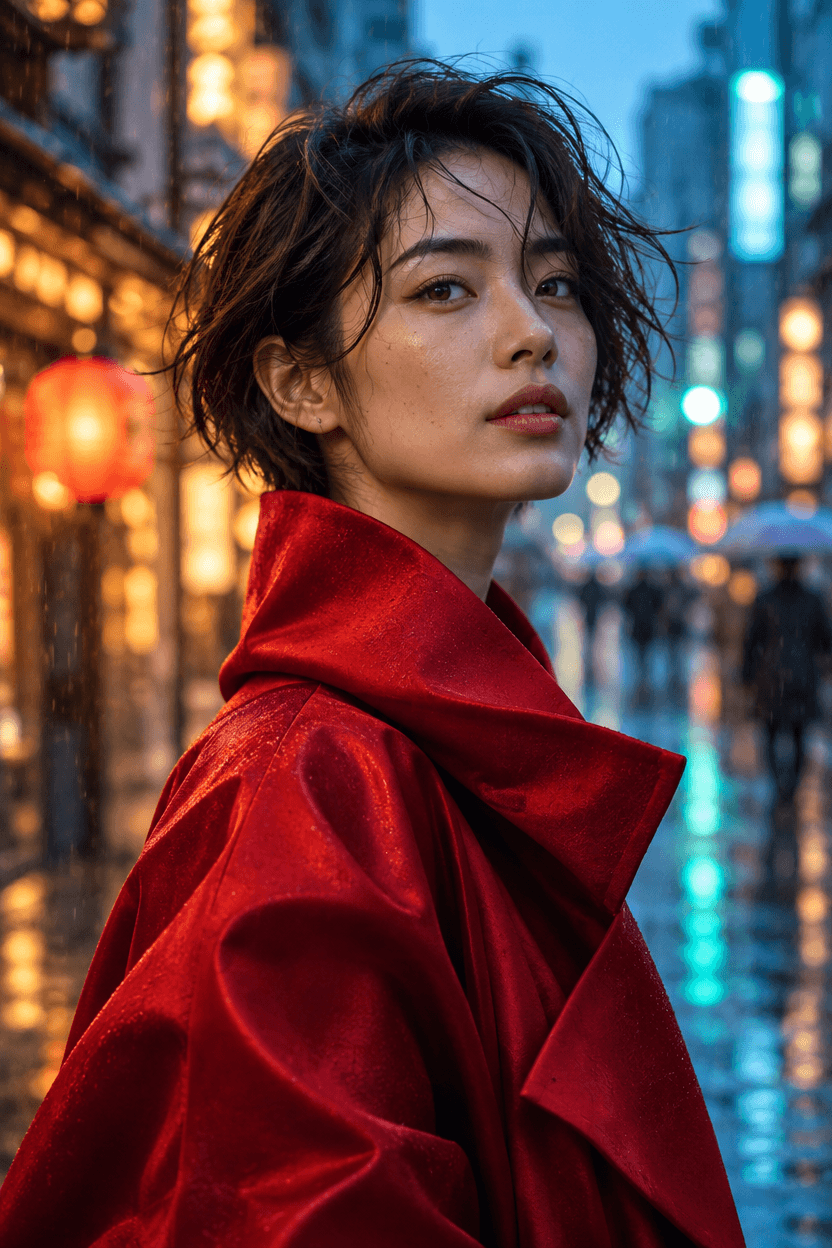 GPT Image 2.6 Flare
832 × 1248 · medium quality
Portrait in the rain
Same prompt · 2:3 · Flare
Prompt
A cinematic editorial portrait photograph of an adult East Asian woman aged 28, short windswept dark hair, expressive eyes and natural skin texture, wearing a sculptural crimson silk coat, standing on a rain-soaked Tokyo street at blue hour, warm shop lights and teal reflections melting into creamy bokeh behind her, subtle raindrops in the air, intimate confident expression, realistic hands out of frame, elegant fashion magazine art direction, 85mm lens look, striking yet believable color, no text, no watermark, no border. Portrait composition, 2:3 aspect ratio.
How to read this comparison
- YourArt prepared and reviewed these examples. Generation conditions differ between versions, so use these outputs to compare how each interprets the brief. They do not establish a general performance ranking.
- The original landscape and portrait pairs share prompts and aspect ratios but differ in pixel dimensions: 1536 × 1024 versus 1248 × 832 for landscapes, with the dimensions reversed for portraits. Judge composition at the same display size; do not infer a resolution or detail advantage from those pairs.
- The new poster pair uses the same 1024 × 1024 dimensions. Each new example was requested once, with one output and medium quality. All five first outputs are included, without selection from reruns.
- PNG previews are compressed display copies. Original new outputs are linked separately; no retouching, text correction or generative repair was applied. The edit input is the previously published portrait. These few examples cannot establish a win rate, typical speed or average price.
English poster text: the same brief at 1024 × 1024
One image per model, both at medium quality, with identical wording and no reference image. This fictional coffee promotion tests text and instruction following; it is not a live offer.
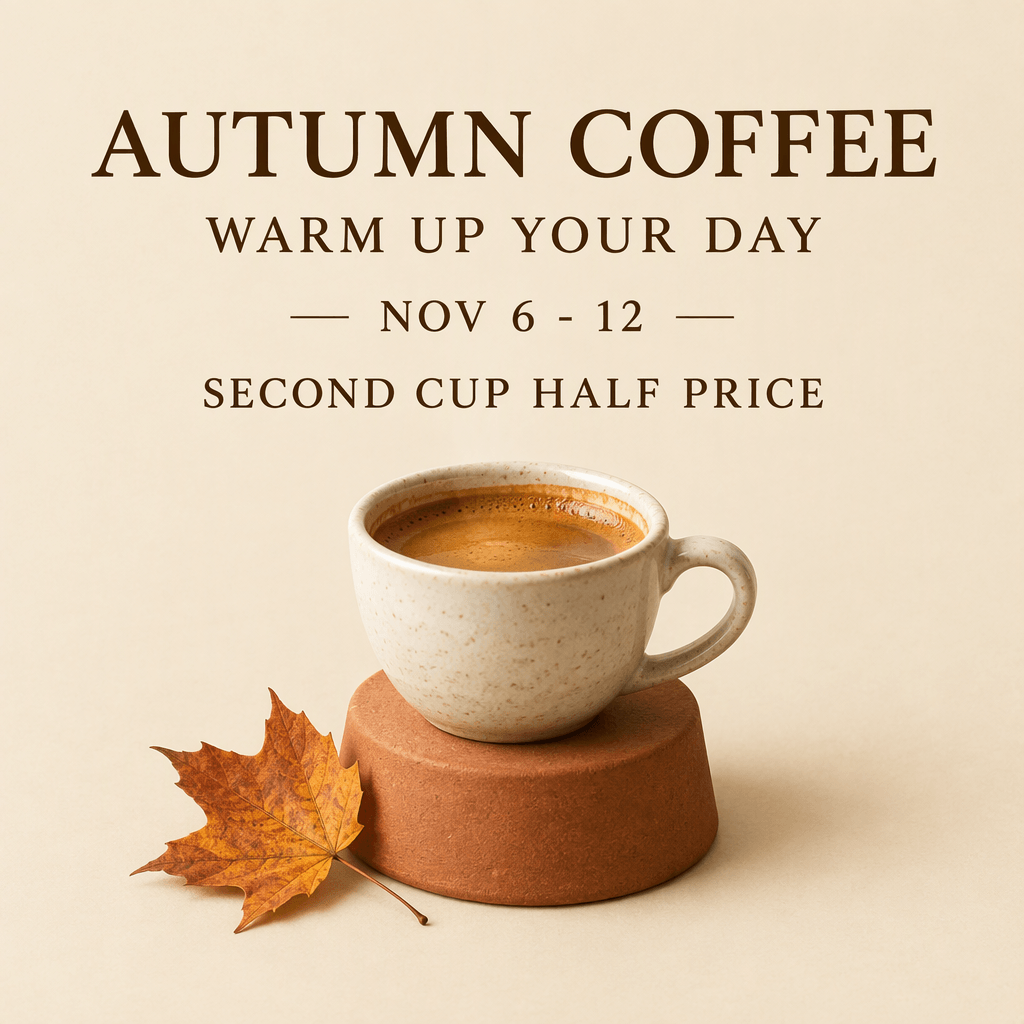
2.5 · English coffee poster
All four requested text lines are visibly present. The cup contains dark coffee without latte art, matching the espresso brief; text occupies less of the composition than in the 2.6 output.
GPT Image 2.5 Flare
1024 × 1024 · medium quality · 1 output · PNG
Full prompt
Create a refined square promotional poster for a fictional coffee shop. Warm cream paper background, a photorealistic espresso cup on a small terracotta pedestal in the lower half, one subtle autumn leaf, generous negative space, carefully aligned elegant typography in dark brown. Render exactly these four English text lines, with no extra text: "AUTUMN COFFEE", "WARM UP YOUR DAY", "NOV 6 - 12", "SECOND CUP HALF PRICE". All visible words must be English only. Keep every letter and digit legible and correct. No logo, no watermark, no border.
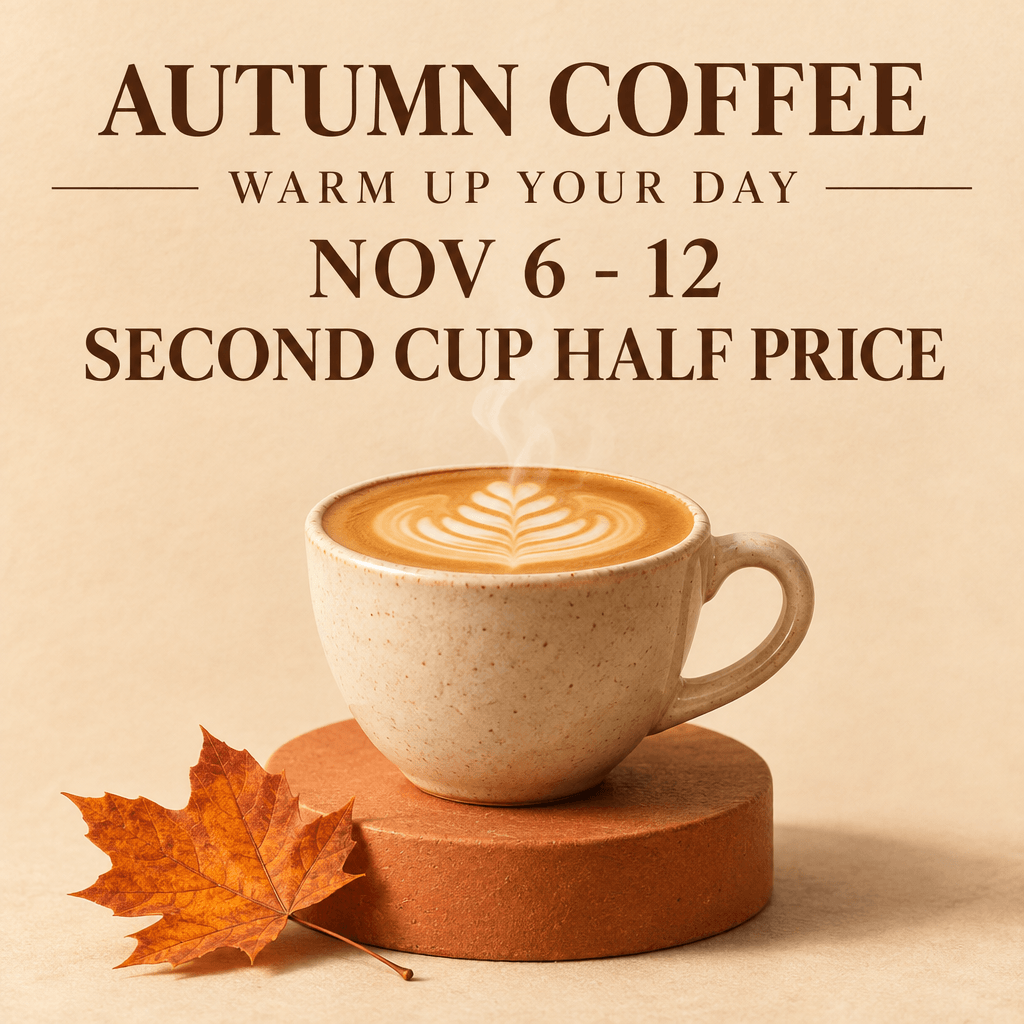
2.6 · English coffee poster
All four requested text lines are visibly present. The promotional line is larger, but the model adds latte art despite the espresso instruction. Readable text does not mean every visual instruction was followed.
GPT Image 2.6 Flare
1024 × 1024 · medium quality · 1 output · PNG
Full prompt
Create a refined square promotional poster for a fictional coffee shop. Warm cream paper background, a photorealistic espresso cup on a small terracotta pedestal in the lower half, one subtle autumn leaf, generous negative space, carefully aligned elegant typography in dark brown. Render exactly these four English text lines, with no extra text: "AUTUMN COFFEE", "WARM UP YOUR DAY", "NOV 6 - 12", "SECOND CUP HALF PRICE". All visible words must be English only. Keep every letter and digit legible and correct. No logo, no watermark, no border.
What this sample supports
Both models rendered the four requested text lines without an obvious missing or incorrect character on visual review. The 2.5 image follows the espresso instruction more closely; the 2.6 image adds latte art and uses larger promotional text. This pair gives no basis to claim that 2.6 is universally better at English text. Choose based on your own brief and proofread before publication.
Specs
Feature comparison
What each version supports on YourArt today. Flare and Sunburst share the same controls within each version.
| Model | GPT Image 2.5 | GPT Image 2.6 |
|---|---|---|
| GIF animationNew | Not available | Yes |
| Output formatsNew | PNG · JPEG · WebP | PNG · JPEG · WebP · GIF |
| Max resolution | Up to 4K | Up to 4K |
| Reference images | Up to 16 | Up to 16 |
| Quality levels | Low / Medium / High / Extra High / Maximum | Low / Medium / High / Extra High / Maximum |
| Transparent background | Yes | Yes |
Pricing
What each image costs
Estimates for one medium-quality image with no references. You’ll see the estimated credits before generating and pay for actual usage.
GPT Image 2.6 Flare
Still · 1:1 · 1K
3.856credits
≈ $0.10
GPT Image 2.6 Sunburst
Still · 1:1 · 1K
3.856credits
≈ $0.10
GPT Image 2.6 Flare
GIF · 9 frames · 512 × 512
5.51credits
≈ $0.14
GPT Image 2.6 Sunburst
GIF · 9 frames · 512 × 512
5.51credits
≈ $0.14
GPT Image 2.5 Flare
Still · 1:1 · 1K
0.6credits
≈ $0.02
GPT Image 2.5 Sunburst
Still · 1:1 · 1K
0.6credits
≈ $0.02
GPT Image 2.5 Flare
GIF · 9 frames · 512 × 512
Not available
GPT Image 2.5 Sunburst
GIF · 9 frames · 512 × 512
Not available
Medium quality, one image, no references. You’re charged for actual usage. USD is based on the site’s standard credit rate; your rate depends on the credit pack you buy.
Prompt
A cinematic landscape photograph of an alpine lake at sunrise, natural colors, no text.
Frequently asked questions
Is GPT Image 2.6 better than 2.5?
It does more: 2.6 adds GIF output. For still images, which one looks better depends on your prompt and taste. Run a few of your typical prompts through both at the same settings before switching.
Should I pick Flare or Sunburst?
Start with Flare at medium quality. If you want a different take, run the same prompt on Sunburst and compare. Pick based on the result and the cost, not a general ranking.
Is GPT Image 2.6 more expensive than 2.5?
It depends on the request. Size, quality, references and format all change the cost. Compare the estimates for the settings you actually use; the price cards above show a typical example. You’re charged for actual usage.
Can I still use GPT Image 2.5?
Yes. Pick 2.5 or 2.6 and a tier in the generator before opening the canvas. If a model is temporarily unavailable, we’ll tell you. It’s never silently swapped for another one.
Do my 2.5 prompts work on 2.6?
Yes, you can reuse them as they are, but the same words won’t produce the same image. Keep the subject and key details clear, look at the first result, then fine-tune the wording.
About these examples
Prepared and reviewed by YourArt · Last reviewed:
Browsing examples and preparing a prompt does not spend credits. Generation requires an account and sufficient credits. For commercial work, review the applicable terms and your rights to reference material; these examples do not provide rights clearance. Check the privacy policy before uploading personal or confidential images.
See the difference with your own prompt
Pick a version and a tier, generate, and compare the results side by side on the canvas.